Interactive scenes (Views) are instantiated by 1000Words.js in a DOM element specified by the application.
Views contain Shapes.
Shapes are instances of Shape Types.
The application specifies each shape's position (x, y) expressed as a percentage of the view's width and height.
The definition of what a shape looks like is defined once per Shape Type in the form of SVG (string snippets).
Views can be configured to publish events when a shape is clicked or comes in focus, the viewport changes (zoom or pan), view changes etc. The application can subscribe to these events.
Shape Groups contain one or more shape instances, of one or more shape types, and are used to configure:
- Shape Resolutions. Display at different levels of detail at various zoom levels.
- Layers (optional). Groups of shapes that come into, or go out of, existence at different zoom levels.
A couple of potential uses of layering are:
- The domain is visually arranged such that users are intuitively expecting objects to show up at deeper zoom levels
- Give users an indication that a group of shapes (that are too small to be seen at low zoom levels) exists at a certain place in the view. As the user zooms in, the placeholder indicator(s) go away and can be replaced by the relevant domain objects.
Drilldown into shapes is supported. When a user dives into (zooms in) a shape configred for drilldown, a new sub-view is opened up. One or more shapes in the new view can, in turn, be configured for drilldown (recursive).
Infinite Canvas can be used for very large screens. A summary or Overview is provide to accompany the Primary View. The overview provides a quick look at what part of the main view is currently visible. It comes with a Viewport Controller which users can drag to quickly pan across the primary view as desired.
▸ HomeA shape type (e.g. Car, Circle, House, Hospital) is expressed as a class that extends the library's built-in shape class
            const DomainShape = $1000Words.import('DomainShape');
            export default class Car extends DomainShape {
                renderContents(node, detailLevel) {...} // shape svg string injection
            }
            // The standardized definition of a shape should render inside a box with
            // 0x0 and 100x100 as the top-left and bottom-right corners.

            // NOTE: The shape definition is independent of how 'large' shape
            // instances are or 'where' they are placed on the scene.

            // square
            <rect x="0" y="0" width="100" height="100" stroke="red"></rect>

            // circle
            <circle cx="50" cy="50" r="50" stroke="blue"></circle>

            // shape with a bunch of paths
            <g>
                <path d="m22.16 ..." stroke="green"></path>
                <path ...></path>
                <path ...></path>
            </g>
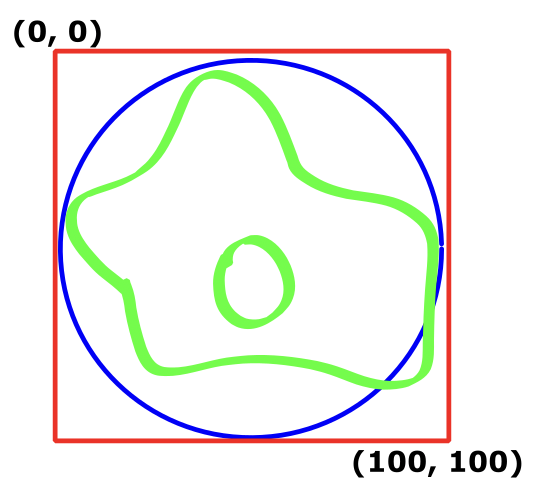
Three shape definitions in the form of a square, circle and collection of paths.
The position is specified in percentage terms when the shape is created.
            $1000Words.createShape(Car, "car-fred", view, options, 10, 8);
            $1000Words.createShape(Car, "car-jimmy", view, options, 85, 90);
            $1000Words.createShape(Truck, "company-truck", view, options, 50.21, 60.07);
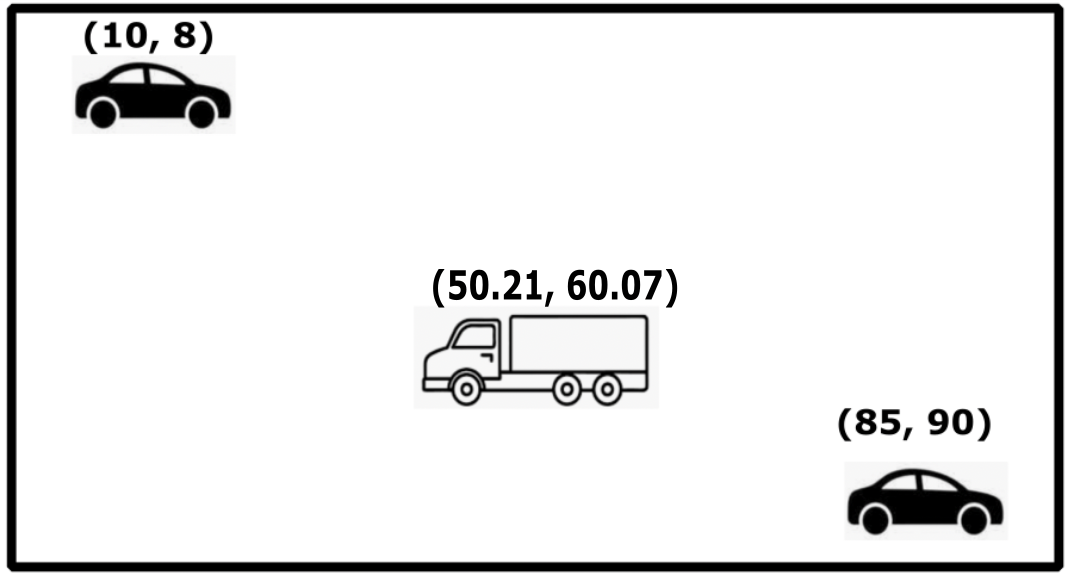
Two cars and a truck.
Home
For graphical scenes, things typically get more detailed as the user zooms in. When using 1000Words.js, it isn't strictly necessary to show shapes in greater level of detail as the user zooms in. However the UX design of the scene can often involve showing shapes at different amounts of detail, depending on the zoom level.
        const ShapeConfigurations = $1000Words.import('ShapeConfigurations');
        const configs = new ShapeConfigurations( {
            shapeTypes: [], // optional - use when svg template elements are used
            groups: [{
                    name: 'trees',
                    existences: {1 : 0.5, 20 : 0}, // covered in the 'layers' section
                    resolutions: {1 : 'low', 3: 'medium', '8': 'high' },
                    // show the high fidelity version of tree when zoom level goes to 8
                    // and above and medium fidelity version when zoom level goes below 8
                ...
            }]
        })
        ...
        $1000Words.createView('Main View', container, configs, onEvent, eventsOfInterest)
        .then( view => {...} )
Note: The zoom levels at which shape resolutions can change isn't fixed and is determined by the application. The application needs to provide the rendering of the svg shape at different fidelity levels.
        resolutions: {1 : 'low', 2: 'medium', '8': 'high'}
        resolutions: {1 : 'low', 3: 'medium', '4': 'high', '12': 'superhigh'}
        resolutions: {1 : 'far away', 9': 'clear sight', '14': 'rubbing noses'}
        resolutions: {1 : 'standard'} // fixed resolution, independent of zoom level
        // 1000Words.js will determine when it is time to display a shape at a different
        // detail level and ask the shape for the SVG that corresponds to that level
        // (e.g. 'clear sight')
If a house shape is displayed on a scene, the application could decide to show different house details at different levels of zoom, say 'low', 'medium' and 'high'.
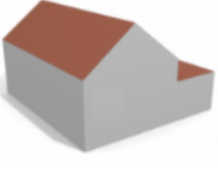 low
low
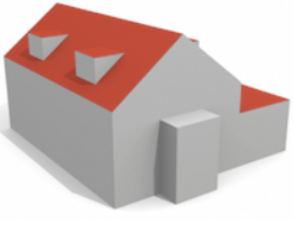 medium
 high
high
Shape Definitions (100x100) for different zoom levels
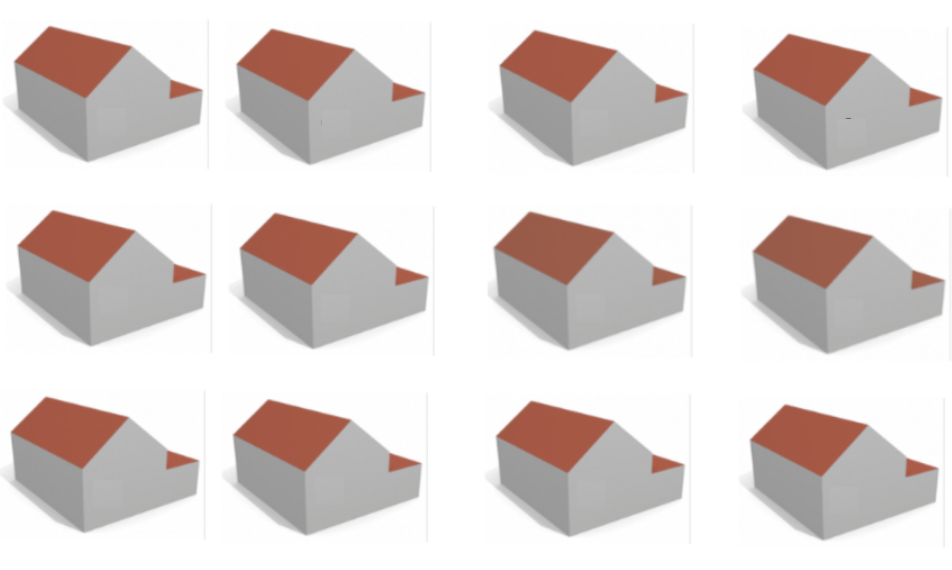
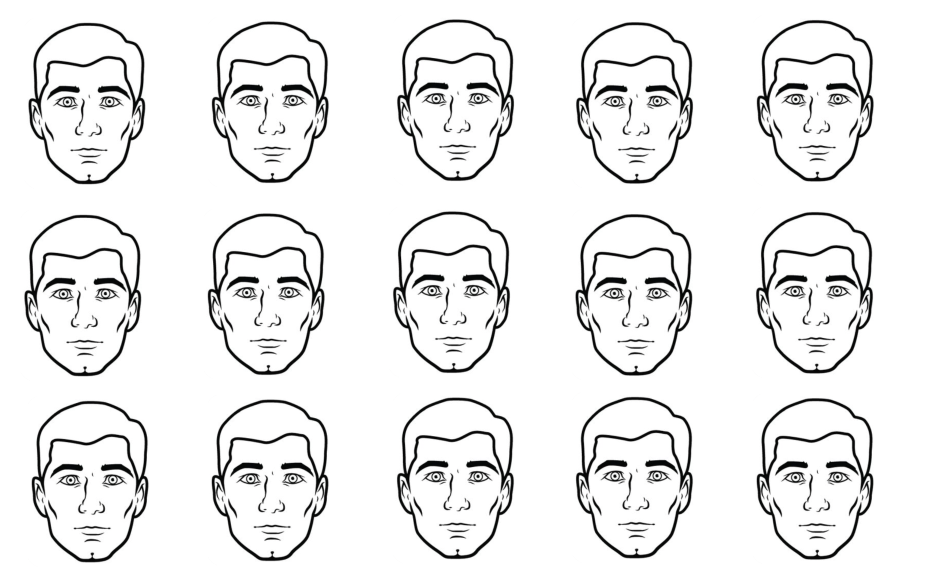
Scene at a low level of zoom
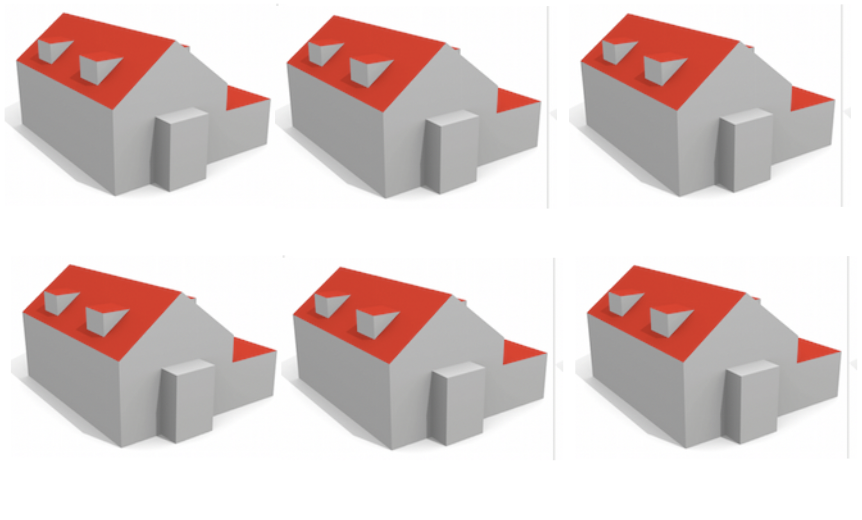
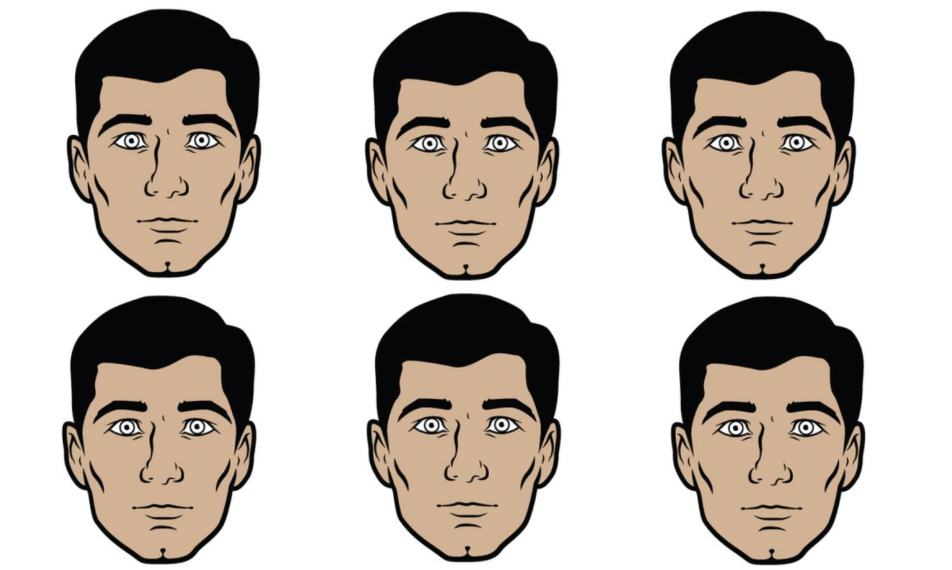
Scene at a medium level of zoom
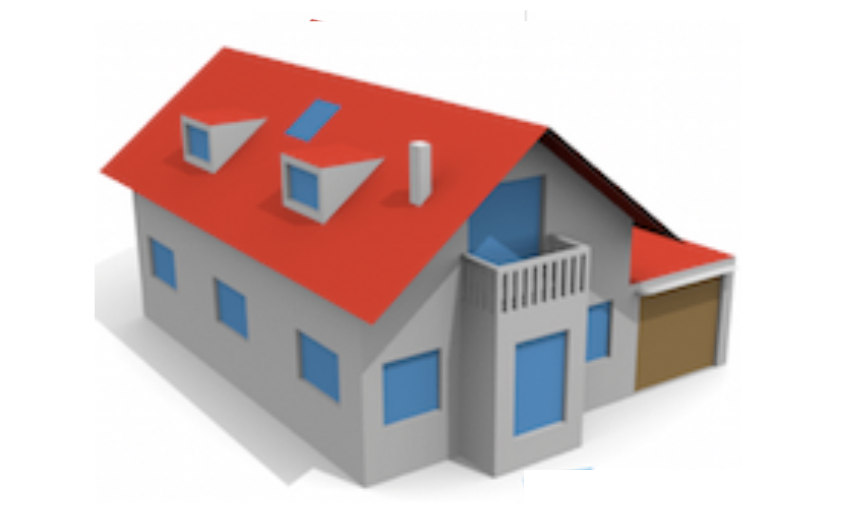

Scene with a high level of zoom
Home
Layers allow groups of shapes to come into or go out of existence. Scene designers can find many creative uses for layers. Two, out of potentially many, potential uses are outlined below:
- Marker Shapes. When a group of shapes with their natural screen size are too small to be
seen without zooming in, and users need a hint of what lies there
Note 1: Marker Shapes are only a visual feature to indicate the presence of smaller domain objects. They are not domain objects, themselves.
Note 2: If a domain object needs to be expanded to reveal additional detail, please use the Drilldown feature discussed in Section 11. - Depth. When the scene naturally contains depth or the application designer is able to
creatively visualize a complex technical domain using depth.
Note: Depth should not be used for showing information related to one specific shape on an upper or prior layer. Marker shapes and Drilldown can be used for that.
Depth should only be used when multiple considerations exist in the same physical or logical space
For views that are less strongly coupled, consider implementing separate views.
Examples of different aspects or considerations that occupy the same physical or logical space- NY Grand Central Station with 3 levels of tracks
- Airport Terminals with arrivals, departures, baggage claim
- Multi-storey parking lots, factories, data centers
- Autonomous Vehicles with sensor, detection, prediction and occupancy layers
- Multiple tiers of a supply chain on the same geographic area
            const ShapeConfigurations = $1000Words.import('ShapeConfigurations');
            const configs = new ShapeConfigurations( {
                shapeTypes: [], // optional - use when svg template elements are used
                groups: [{
                        name: 'settings-marker',
                        existences: {1 : 1, 20 : 0},
                        resolutions: {1 : 'standard'}
                    ...
                },
                {
                        name: 'settings',
                        existences: {20 : 8},
                        resolutions: {20 : 'standard' }
                    ...
                }]
            })
            ...
            $1000Words.createView('Main View', container, configs, onEvent, eventsOfInterest)
            .then( view => {...} )
Individual Settings Icons are too small to be seen so a marker shape is used
Zoom level 1
Zoom level 8
Zoom level 16
Zoom level 20
Home
Views are created inside a placeholder DOM element created by the application.
Views need to be created prior to creating individual shapes
and the view instance is a parameter for the createShape call.
View creation takes the following inputs:
- viewName: Logical name
- container: DOM container element
- configs: Shape Configurations that control layers and shape detail
- onEvent: optional app event handler
- events: optional list of events that the app wants to subscribe to
        const ShapeConfigurations = $1000Words.import('ShapeConfigurations');
        const EventType = $1000Words.import('EventType');
        const ShapeEventType = $1000Words.import('ShapeEventType');

        const onEvent = (event) => console.log(event);
        const container = document.getElementById("my-view-container");

        // see 'Layers' & 'Shape Detail Level' for details on shape configs
        const configs = new ShapeConfigurations( {...} );

        const events = [ShapeEventType.IN_FOCUS, ShapeEventType.SELECT, EventType.VIEWPORT];
        $1000Words.createView(viewName, container, configs, onEvent, events)
        .then( view => {
            const shape1 = $1000Words.createShape(type1, id1, view, options, x1, y1);
            ...
            view.initialize();
        });
1000Words views adhere to the "data in, events out" bidirectional pattern. Events of interest are published to the Application, which can then perform other UI tasks.
1000Words components, just like any other HTML components, are used to compose the App. The responsibility, for the overall end-to-end UI interactions, rests with the App.
The "data in" portion of component interactions is covered in the "Modifying Shape Attributes" and "modifying Shape Position" sections. This section covers the "events out" portion.
        EventType.VIEWPORT
            -percentLeft
            -percentTop
            -percentRight
            -percentBottom
        EventType.ViewChanged
            -view
        ShapeEventType.IN_FOCUS
            -shape
        ShapeEventType.CLICK
            -shapeId
        ShapeEventType.SELECT
            -shapeId
        ShapeEventType.DESELECT
            -shapeId
        EventType.CORNER_ACTIVATED
            -shape
            -corner
        EventType.CORNER_DEACTIVATED
            -shape
            -corner
Viewport event. This is emitted whenever the user zooms in or out,
and when the user pans the view in any direction.
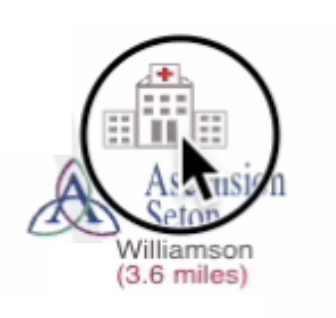
Shape in-focus event. This is emitted when the user
closes in, on a shape and the shape is covering the center of the viewport.
On potential use case for this event is to populate an HTML 'properties panel' with the details of the
in-focus shape. Textual, boolean and enumeration properties of the shape can be displayed or changed here.
View changed event. This can happen when the user drills down
into a shape or jumps out from a child view back onto the parent view.
Shape click event. The user clicks a shape.
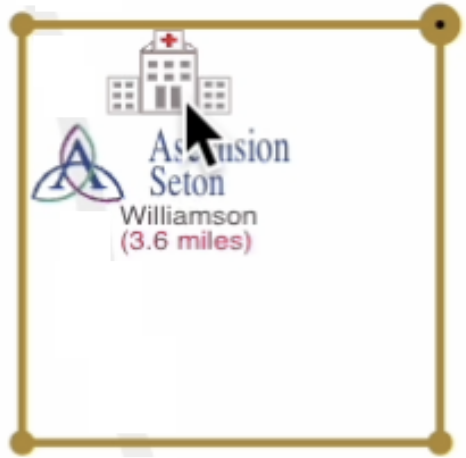
Shape select event. The user shift-clicks on a shape which results in the shape being 'selected'. An enclosing golden rectangle is displayed.
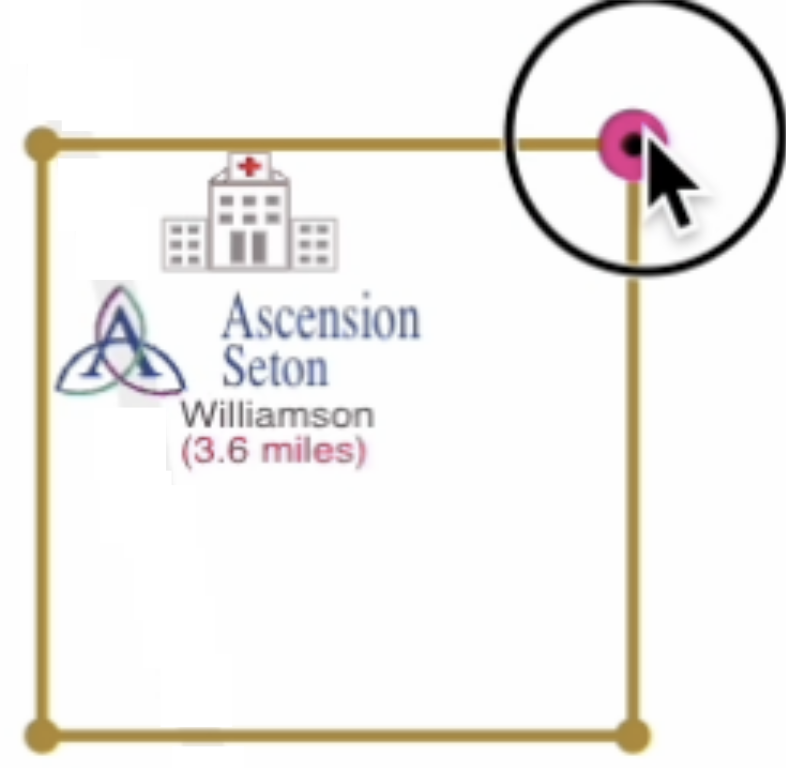
Corner Activated event. 1000Words allows explicit
two step "select + are you sure?" interactions to be developed. Shapes need to be configured to have one
or more "activated corners".
The configuration can be done by specifying the name ('NW', 'NE', 'SE', 'SW') of the desired corner.
Users would shift-click a shape to select it. A selection rectangle is displayed but additionally a larger
"confirm" circle is displayed in the configured corner. Clicking on the activated corner serves as a "yes,
i'm sure" action and a check mark is displayed to indicate this.

    const EventType = $1000Words.import('EventType');
    const ShapeEventType = $1000Words.import('ShapeEventType');
    const ViewportEvent = $1000Words.import('ViewportEvent');
    const container = ...;
    const configs = ...;
    const onEvent = (event) => ...; // business ui logic
    const events = [ShapeEventType.IN_FOCUS, ShapeEventType.SELECT, ViewportEvent];
    $1000Words.createView('main-view', container, configs, onEvent, events).then( view => {
        ...
    }
Applications need to render different shape instances of the same shape type differently, based on their
characteristics and maybe even change the apperance dynamically as the attributes change.
1000Words provides a way to create attributes on shapes, through the setAttr
call. The call takes an attribute name and value.
The render logic in Shape classes can then access these attributes to conditionally render shapes.
NOTE: If a shape's attributes are dynamically changed after initial creation, say as part of some user
interaction or event, 1000Words will automatically re-render (just) that shape.
    -- Shape Classes --
    const DomainShape = $1000Words.import('DomainShape');
    export default class House extends DomainShape {
        getShapeRenderString(svgComplexity) {
            return `<g>
                <path d="..." style="fill: ${this.attrs.doorColor}"></path>
                <path d="..." style="fill: ${this.attrs.roofColor}"></path>
            </g>`;
        }
    }
    export default class Automobile extends DomainShape {
        getTruckSVG(color) {...}
        getCarSVG(color) {...}
        getShapeRenderString(svgComplexity) {
            return this.attrs.type === 'Truck'
              ? getTruckSVG(this.attrs.color)
              : getCarSVG(this.attrs.color);
        }
    }

    -- App Code --
    $1000Words.createView(viewName, container, configs, onEvent, events)
    .then( view => {
        const house = $1000Words.createShape(House, 'white-house', view, options, x1, y1);
        house.setAttr('doorColor', 'white');
        house.setAttr('roofColor', 'slategrey');
        const auto = $1000Words.createShape(Automobile, 'my-ride', view, options, x2, y2);
        auto.setAttr('type', 'Car');
        auto.setAttr('color', 'red');
        ...
        view.initialize();
    });

    // elsewhere in the app...
    // 1000Words will take care of immediately re-rendering shapes after setAttr is called.
    house.setAttr('doorColor', 'red');
    house.setAttr('roofColor', 'lightcoral');
    auto.setAttr('type', 'Truck');
The ability to move shapes adds a layer of dynamism on top of view interactivity. 1000Words
provides a movePercent call on shapes for this.
NOTE: When moving a large number of shapes over and over (multiple steps to get to the destination
instead of one) performance can become a consideration. 1000Words provides a recalibrateShapes
call on the view to prevent or reduce degradation.
The current design requires the application to keep track of the shapes that are being moved and call
recalibrateShapes after the move is done.
        const fruits = [];
        anApple.movePercent(43.24, 27.6);
        fruits.push(anApple);
        aBanana.movePercent(64.1, 75);
        fruits.push(aBanana);
        anOrange.movePercent(13.7, 20);
        anOrange.movePercent(14.0, 20);
        anOrange.movePercent(14.3, 20);
        view.recalibrateShapes(fruits);
Home
Programmatic movement in a view adds a dynamic, somewhat movie-like facet to the
user's experience because they are not always manually panning or zooming the view.
A partial list of when this movement could be initiated ...
- User clicks on a munu item, action button, checkbox etc.
- User interacts with another Shape or does an action in a different part of the app
- An external event is received by the application
Applications can design interesting and useful functions based on this feature. A few possibilities to jumpstart the creativity ...
- Move to a different section of the view or drill down into a Shape or jump out of a child view (that was previously drilled down into) in response to
- Explicit user action
- An action or an event
- Search function to navigate the user to a specific shape
- Multi-browse a set of domain artifacts or shapes in sequence, in a movie-like mode
Both, zooming in and out as well as panning in all four directions is accomplished by the same two API calls, createViewport and setViewport.
    // viewport coordinates and zoom scale
    const viewport = $1000Words.createViewport(x1, y1, x2, y2, scale);
    // programmatic move to specified viewport over a specified time
    view.setViewport(viewport, seconds);
Note 1: The createViewport currently requires x1, y1, x2, y2 and scale parameters to create a Viewport. This could potentially be more streamlined in the future.
Note 2: The second parameter in the setViewport call is the approximate number of seconds over which the animation will occur. Based on the specifics of the viewport change and the shapes that are present, as well as the underlying browser renders, this time will not be exactly honored. Pleasing animation effects can be achieved by experimentation for each given situation and tweaking the number of seconds so that the viewport change is smooth and not too fast or slow.
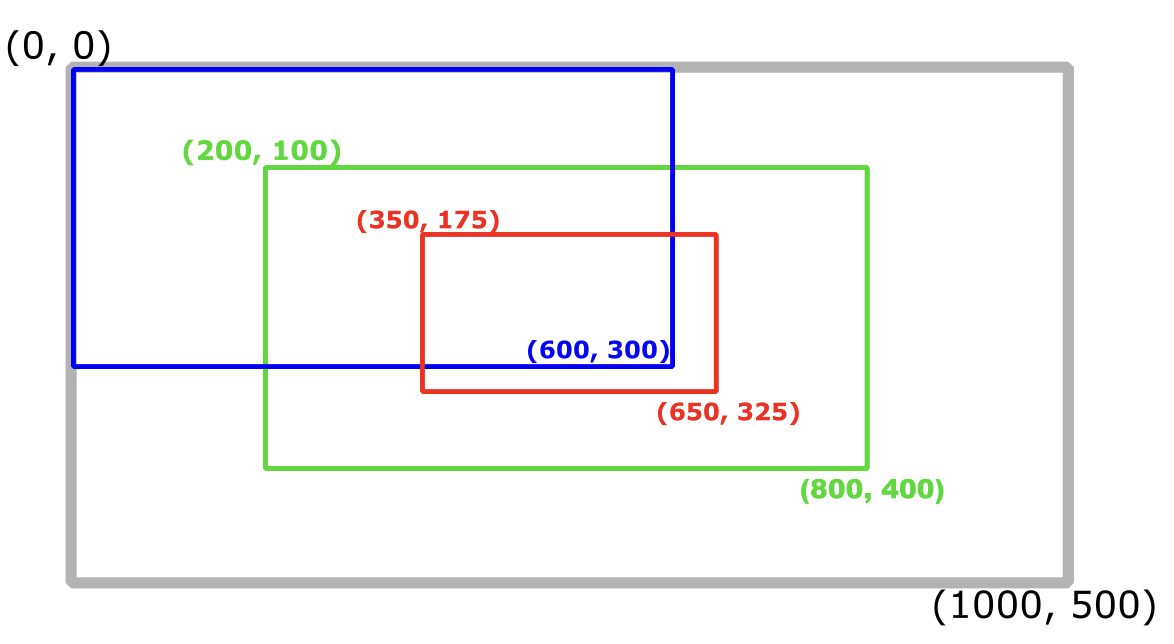
    const blueViewport = $1000Words.createViewport(0, 0, 600, 300, 1.666666667);
    const redViewport = $1000Words.createViewport(350, 175, 650, 400, 3.33333333);

    // moving from green viewport to red viewport in 4 seconds
    view.setViewport(redViewport, 4);
    // moving from green viewport to blue in 5 seconds
    view.setViewport(blueViewport, 5);
    // moving from anywhere to blue viewport (source viewport doesn't matter)
    view.setViewport(blueViewport, 5);
    // zoom and pan to a shape and then continue zooming in until drilldown into a new
    // view (requires the shape to have been configured as drilldownable)
    view.drilldownToShape(aShape, 6));  // movement in 6 seconds

    // same as drilldownToShape but using the shape's id instead of the actual instance
    view.drilldownToShapeId('a-shape-id', 6));

    // zoom out until the top of the view (biggest viewport) is reached
    view.zoomOutToTopOfView(6);

    // zoom out to the top of the view and a bit more to jump out to parent view
    view.jumpOutToParentView(); // no time duration parameter needed
Home
Drilldown happens when the user zooms in and gets close to a shape that has been configured for drilldown.
The library creates the child view in the same place in the DOM as the parent view, ties the parent and child view together. It initializes the child view and creates the shapes in it.
Since the library is doing all of this, the app does not need to call any of the library API. It just needs to provide the shape metadata.
    const options = { drilldown: true, clickable: false, selectable: undefined };
    // or
    const options = { drilldown: true };

    const shape = $1000Words.createShape(ShapeType, 'shape-id', view, options, x, y);
    const domainObjects = getObjectsFromDatabaseOrNetwork(...);
    const shape1s = [];
    domainObjects.forEach( do => {
        shape1s.push({
            typeName: 'ShapeType1',
            type: ShapeType1,
            x: ...,  y: ... // figure out x, y placements based on biz rules
            id: do.id,
            attrs: { attr1: do.attr1, attr2: do.attr2 },
            options: {}
        })
    })
    return ({
        name: 'ChildViewName',
        shapeTypes: [...], // optional - use if svg template elements are needed
        groups: [
            {
                name: 'shapes-type-1',
                existences: {...},
                resolutions: {...},
                shapes: shape1s
            },
            {
                ...
                shapes: shape2s
            }
        ]
    })
This section combines all the necessary bits of code in one place so the user knows all the parts that are needed. However, the preceeding sections will contain more details and explanations on each individual topic.
    // Shape Class 1
    const DomainShape = $1000Words.import('DomainShape');
    export default class Car extends DomainShape {
        renderContents(detailLevel) {
            return `<g> <path d="m22.16 ..." stroke="green"></path>  ... </g>`;
        }
    }
    // Shape Class 2
    const DomainShape = $1000Words.import('DomainShape');
    export default class Truck extends DomainShape {
        renderContents(detailLevel) {
            return `<g> <rect x="25" ... ></rect> <path d="..."></path> </g>`;
        }
    }

    // View Class
    const EventType = $1000Words.import('EventType');
    const ShapeConfigurations = $1000Words.import('ShapeConfigurations');
    const ShapeEventType = $1000Words.import('ShapeEventType');

    import Car from '<shapes-dir>/car';
    import Tree from '<shapes-dir>/tree';
    import Truck from '<shapes-dir>/truck';

    const onEvent = (event) => console.log(event);
    const events = [ShapeEventType.IN_FOCUS, ShapeEventType.SELECT, EventType.VIEWPORT_EVENT]
    const container = document.getElementById("my-view-container");

    const configs = new ShapeConfigurations( {
        shapeTypes: [...],
        groups: [{
            name: 'trees',
            existences: {1 : 0.5, 20 : 0},
            resolutions: {1 : 'low', 3: 'medium', '8': 'high'}
        },
        {
            name: 'autos'
            ...
        }]
    })
    const appCallbacks = {
        getDrilldownMetadata: (shape) => {
            return {name: 'ChildView', shapeTypes: [...], groups: [{}, ...]};
        }
    }
    $1000Words.createView(viewName, container, configs, onEvent, events, appCallbacks)
    .then( view => {
        const options = {drilldown: false, clickable: true, selectable: {'nw'}};
        const car1 = $1000Words.createShape(Car, 'car-1', view, options, x1, y1);
        const truck3 = $1000Words.createShape(Truck, 'truck-3', view, options, x2, y2);
        const aTree = $1000Words.createShape(Tree, 'a-tree', view, options, x3, y3);
        ...
        configs.setShapes({
            'autos': [car1, truck3],
            'trees': [aTree]
        })
        view.initialize();
    });
Home
        const ShapeConfigurations = $1000Words.import('ShapeConfigurations');
        const DomainShape = $1000Words.import('DomainShape');
        const ShapeEventType = $1000Words.import('ShapeEventType');
        const DomainShape = $1000Words.import('DomainShape');
        export default class House extends DomainShape {
            getShapeRenderString(svgComplexity) {
                return `<g>
                    <path d="..." style="fill: ${this.attrs.doorColor}"></path>
                    <path d="..." style="fill: ${this.attrs.roofColor}"></path>
                </g>`;
            }
        }
        export default class Automobile extends DomainShape {
            getTruckSVG(color) {...}
            getCarSVG(color) {...}
            getShapeRenderString(svgComplexity) {
                return this.attrs.type === 'Truck'
                  ? getTruckSVG(this.attrs.color)
                  : getCarSVG(this.attrs.color);
            }
        }
        const ShapeConfigurations = $1000Words.import('ShapeConfigurations');
        const EventType = $1000Words.import('EventType');
        const ShapeEventType = $1000Words.import('ShapeEventType');

        const onEvent = (event) => console.log(event);
        const appCallbacks = ...;
        const container = document.getElementById("my-view-container");

        // see 'Layers' & 'Shape Detail Level' for details on shape configs
        const configs = new ShapeConfigurations( {...} );
        const events = [ShapeEventType.IN_FOCUS, ShapeEventType.SELECT, EventType.VIEWPORT];
        $1000Words.createView('view-name', container, configs, onEvent, events, appCallbacks)
        .then( view => {
            ...
            ...
            view.initialize();
        });
        const ShapeConfigurations = $1000Words.import('ShapeConfigurations');
        const configs = new ShapeConfigurations( {
            shapeTypes: [], // optional - use when svg template elements are used
            groups: [{
                    name: 'trees',
                    existences: {1 : 2},
                    // a tree = 2% of overall view width when view is displayed
                    resolutions: {1 :'low', 3:'medium', '8':'high' } // detail level config
                    // zoom level (top of view)= 1, show the 'low' res version of trees
                    // zoom level > 1 and <= 3, show the 'low' res version of trees
                    // zoom level > 3 and <= 8, show the 'medium' res version of trees
                    // zoom level > 8, show the 'high' resolution version of trees
                ...
            }]
        })
        ...
        $1000Words.createView('Main View', container, configs, onEvent, eventsOfInterest)
        .then( view => {...} )
        const ShapeConfigurations = $1000Words.import('ShapeConfigurations');
        const configs = new ShapeConfigurations( {
            shapeTypes: [], // optional - use when svg template elements are used
            groups: [{
                    name: 'big',
                    existences: {1: 20, 10 : 0}, // the shapes included in the
                    // 'big' group will be visible in the beginning (zoom = 1) with a size
                    // of 20% of the view and will be hidden when the user zooms past 10
                    resolutions: {1 : 'standard'}
                ...
            },
            {
                    name: 'medium',
                    existences: {12 : 10, 15: 0}, // 10% of viewport when zoom is 12
                    resolutions: {4 : 'standard' }
                ...
            },
            {
                    name: 'small',
                    existences: {150 : 7, 30: 0},
                    resolutions: {20 : 'standard' }
            }
        })
        ...
        $1000Words.createView('Main View', container, configs, onEvent, eventsOfInterest)
        .then( view => {...} )
    import Car from '/car';
    import Tree from '/tree';
    import Truck from '/truck';
    const options = {drilldown: false, clickable: true, selectable: {'nw'}};
    $1000Words.createView(viewName, container, configs, onEvent, events, appCallbacks)
    .then( view => {
        $1000Words.createShape(Car, "car-fred", view, options, x1, y1);
        $1000Words.createShape(Car, "car-jimmy", view, options, x2, y2);
        $1000Words.createShape(Truck, "company-truck", view, options, x3, y3);
        ...
        ...
        view.initialize();
    });
    house.setAttr('doorColor', 'white');
    house.setAttr('roofColor', 'slategrey');
    auto.setAttr('color', 'red');
    const fruits = [];
    anApple.movePercent(43.24, 27.6);
    fruits.push(anApple);
    aBanana.movePercent(64.1, 75);
    fruits.push(aBanana);
    anOrange.movePercent(13.7, 20);
    anOrange.movePercent(14.0, 20);
    anOrange.movePercent(14.3, 20);
    view.recalibrateShapes(fruits);
    // viewport coordinates and zoom scale
    const viewport = $1000Words.createViewport(x1, y1, x2, y2, scale);
    // programmatic move to specified viewport over a specified time
    view.setViewport(viewport, seconds);
    // viewport coordinates and zoom scale
    const viewport = $1000Words.createViewport(x1, y1, x2, y2, scale);
    // programmatic move to specified viewport over a specified time
    view.setViewport(viewport, seconds);
    // zoom out until the top of the view (biggest viewport) is reached
    view.zoomOutToTopOfView(6);
    // zoom and pan to a shape and then continue zooming in until drilldown into a new
    // view (requires the shape to have been configured as drilldownable)
    view.drilldownToShape(aShape, 6));  // movement in 6 seconds

    // same as drilldownToShape but using the shape's id instead of the actual instance
    view.drilldownToShapeId('a-shape-id', 6));
    // Unlike the main view, child views (from drilldown) are created by the library.
    // This also includes the shapes that need to go on the child view.
    // Therefore the app only needs to provide the metadata for the child view and not
    // explicitly call 'createView' and 'createShape'.

    // configuring shapes to be drilldownable, while creating the parent view.
    const options = { drilldown: true, clickable: false, selectable: undefined };
    // or
    const options = { drilldown: true };


    // providing drilldown or child view metadata
    getDrilldownMetadata: (parentShape) => {
        // figure out what needs to go into the child view for parentShape
        const trees = [
            {
                // tree-1 metadata
                typeName: 'Tree',
                type: Tree,
                x: ...,  y: ... // figure out x, y placements based on biz rules
                id: 'tree-1',
                attrs: { attr1: val1, attr2: va2 },
                options: {}
            },
            { tree-2 ...},
            { tree-3 ...}
        ];
        const bushes = ...;
        const rocks = ...;
        return ({
            name: 'LandscapeView',
            shapeTypes: [...], // optional - use if svg template elements are needed
            groups: [
                {
                    name: 'trees',
                    existences: {...},
                    resolutions: {...},
                    shapes: trees
                },
                {
                    name: 'bushes'
                    shapes: bushes,
                    ...
                },
                {
                    name: 'rocks',
                    shapes: rocks
                    ...
                }
            ]
        })
    }
Home
- Well-Formed and Strictly-Necessary markup
- Working with data binding frameworks
- SVG instancing
If SVG editing tools are used to create the shapes SVGs used in a 1000Words view (e.g. Inkscape, Adobe Illustrator etc) there is a high likelihood of the markup containing tool specific markup for the tool to be able to allow users to re-edit the files). Since 1000Words just needs the minimal SVG that defines the shape, there is no point in including this extra markup that could slow down browser rendering.
It is also likely that the initial markup generated by these tools have "ids" attached to many elements and sub-elements that cause the browser to process and store more things in its memory. 1000Words does its own manipulation of SVG during user interactions and will dynamically add an "id" on the top level of all rendered shapes and the ids generated by the tools are unnecessary and will be duplicated in all rendered shapes, which is inefficient and incorrect.
Tools can also have quirks like creating self closing tags. This type of markup may not cause a problem when it is statically parsed and rendered by the browser but for the markup that 1000Words dynamically injects without full page level reparsing/re-rendering, there can be rendering issues if the markup isn't well formed.
    <g tool-specific-prop="...">

        <tool-specific-tags>
            ...
        </tool-specific-tags>

        <path id="path3191-9" style="fill:#edc496..." d="m 9.544... z" />
        <rect tool-specific-prop="..." id="rect-399" style="..." x="..." y="..." />
    </g>

    ⬇

    <g>
        <path style="fill:#edc496..." d="m 9.544... z"></path>
        <rect style="..." x="..." y="..."></rect>
    </g>
When using 1000Words inside of an application built with data binding frameworks like React or Angular, it is easy to run into a problem where the 1000Words View is created unexpectedly and repeatedly.
Typically the 1000Words View will be encapsulated in a React or Angular Component so that it fits in with the overall App component hierarchy
With data-binding, the frameworks will intentionally re-run component logic for any number of obvious or non-obvious reasons. This this will filter down to an component hooks where the 1000Words is created. We don't want this to happen.
Developers are free to solve this in any manner that fits with their specific application design. A couple of simple, general purpose solutions are shown below and hopefully they can provide a jump start to developers.
    -- MINIMAL CODE --
    (what probably works the best and is easiest to understand)
    import { useEffect } from "react";
    let initialized = false;
    const ShapeConfigurations = $1000Words.import('ShapeConfigurations');
    function MyComponent() {
        useEffect(() => {
            if (!initialized) {
                initialized = true;
                const container = document.getElementById("view-container");
                const configs = new ShapeConfigurations( {
                    shapeTypes: [...],
                    groups: [...]
                })
                $1000Words.createView(...).then( view => {
                })
            }
        }, []);
        return <div />
    }

    -- SLIGHTLY MORE "REACT LIKE" module pattern --
    let viewPromise = null;
    export function ensureViewCreated(viewName, container, configs, ...) {
      if (!viewPromise) {
        viewPromise = $1000Words.createView(...);
      }
      return viewPromise;
    }

    function MyComponent() {
        useEffect(() => {
            ensureViewCreated(...).then(view => ...);
            ...
        }
    }
    (but the MINIMAL inline code shown in the React section above is probably the
    simplest, easiest and effective solution)

    - Service File -
    import { Injectable } from '@angular/core';
    @Injectable({ providedIn: 'root' })
    export class ViewCreationService {
      private viewPromise = null;

      ensureViewCreated(param1, param2, ...) {
        if (!viewPromise) {
          viewPromise = $1000Words.createView(...);
        }
        return viewPromise;
      }
    }


    - Component -
    constructor(private viewFact: ViewCreationService) {}

    ngOnInit() {
      this.viewFact.ensureViewCreated(...).then( view => ... );
    }
This section is presented for completeness only. It is quite unlikely that any interesting, well formed scene will have 1000s of instance of the same shape type. Such a scene would be hard for end users to understand and it would be difficult to locate and work with individual shapes to get the necessary work done.
When custom coding SVG based graphics, developers are able to utilize the SVG instancing technique to reduce the performance degradation that could occur when too many shapes of the same basic type are drawn.
For 1000Words, the library generates the final SVG for the scene, a mechanism is provided to allow developers to implement the custom code equivalent of SVG instancing.
-- CUSTOM CODE --
<defs>
    <rect id="rectangle" width="10" height="10" />

    <g id="soccer-ball">
        <path d="..." fill="var(--fcolor)" /> // customizable prop
        <path d="..." stroke="var(--scolor)"/> // customizable prop
    </g>
</defs>

// shape instancing
<use href="#rectangle id="rect-1" width="15" height="10" />
<use href="#rectangle id="rect-2" width="21" height="14" />
... rect-1000
<use href="#soccer-ball"> id="socc-1" style="--fcolor: blue; --scolor: red;" />
<use href="#soccer-ball"> id="socc-2" style="--fcolor: green; --scolor: yellow;" />
... socc-1000

⬇

-- 1000WORDS CODE --
// 1. Implement the 'getSVGDefs()' method in the relevant shape classes
// 2. Populate the 'shapeTypes' property of the configs used for the View

class Rectangle extends DomainShape {
    // class method
    static getSVGDefs() {
        return `<rect id="rectangle" width="10" height="10"><rect>`;
    }
    // instance method
    getShapeRenderString(detailLevel) {
        return `<use href="#rectangle"
                    width="${this.attrs.width}"
                    height="${this.attrs.height}">
                </use> `;
    }
}
class SoccerBall extends DomainShape {
    // class method
    static getSVGDefs() {
        return `
            <g id="soccer-ball">
                <path d="..." fill="var(--fcolor)" />
                <path d="..." stroke="var(--scolor)" />
            </g>
        `;
    }
    // instance method
    getShapeRenderString(detailLevel) {
        return`
            <use href="#soccer-ball"
                style="--fcolor:${this.attrs.fillColor};
                        --scolor:${this.attrs.strokeColor}">
            </use>
        `;
    }
}

// configs used to create the View should have the "shapeType" array populated with
// the shape classes that have the "getSVGDefs()" method implemented
const configs = new ShapeConfigurations( {
    shapeTypes: [Rectangle, SoccerBall],
    groups: [...]
});
$1000Words.createView('viewName', viewContainer, configs, props.onEvent, [eventList).
    then( view => {...});